We bring work scattered across Excel, email and WhatsApp into one system.

Quotes, orders, field service, meter readings, purchasing. We build the screens your team uses and the flows that run on their own in the background, together with you. Approvals happen on the phone, in Telegram.

The system runs on its own or connects to Logo ERP and the other programs you use. The images on this page are real screens from systems two of our customers use every day; the interface language is Turkish. Öntel Bilişim has been building business software since 1996.

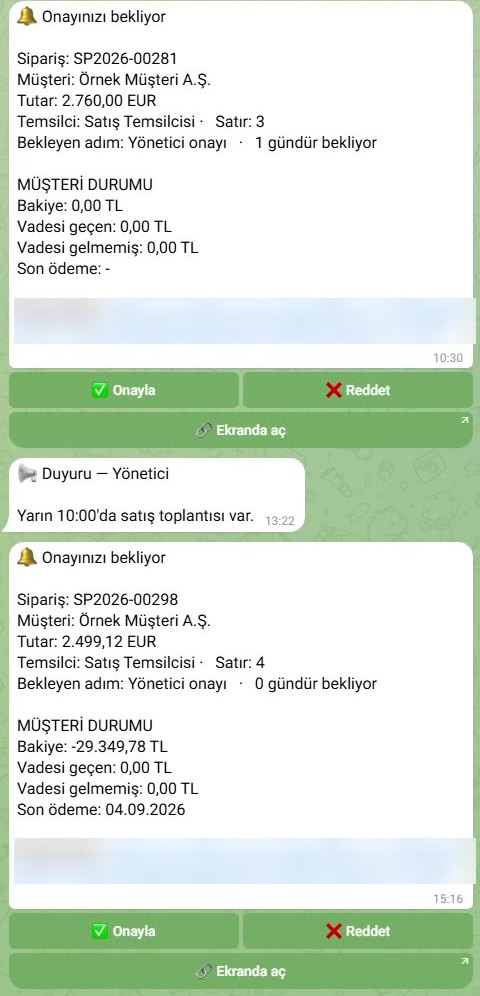
A real approval message on the director's phone (in Turkish): amount, approval step and the customer's balance. Approve or Reject with one tap.

Three products, each brings one kind of work into one place

They all run on the same platform. Start with one and add the others later.

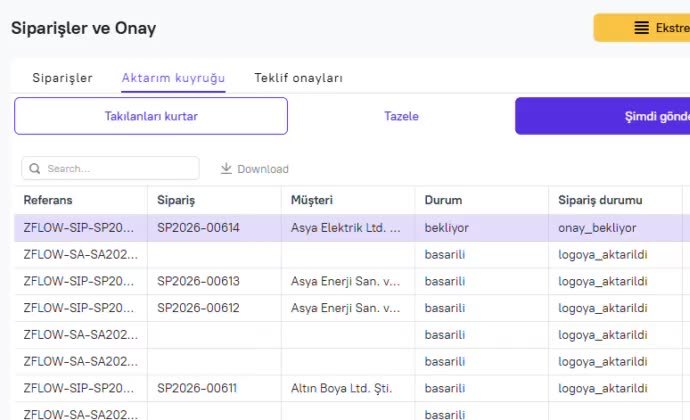
Orders and approval screen: an order awaiting approval and orders transferred to Logo ERP

At Sesinoks, approved orders are transferred to Logo ERP automatically; anything that gets stuck shows up in the list.

zFlow Süreç

Quotes, approvals, orders, sourcing, purchasing. Built around how your business works today; runs on its own or connected to your ERP, with approvals in Telegram.

zFlow Süreç page (in Turkish)
Meter botbot
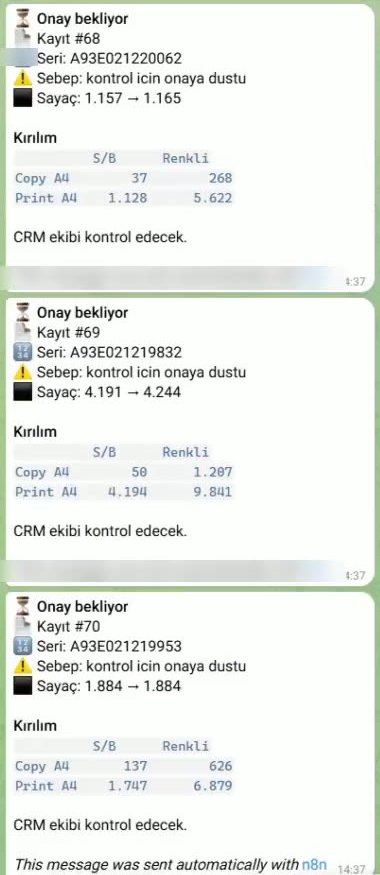
Meter reading records in Telegram: serial number, previous and new counter, black-and-white and colour breakdown, awaiting approval

At Tek, the technician sends a photo of the meter; suspicious readings go to the team for approval.

zFlow Servis

Service requests, technicians, meter readings, service reports and invoicing from meter readings. A ready-made system for rental and field service companies.

zFlow Servis page (in Turkish)
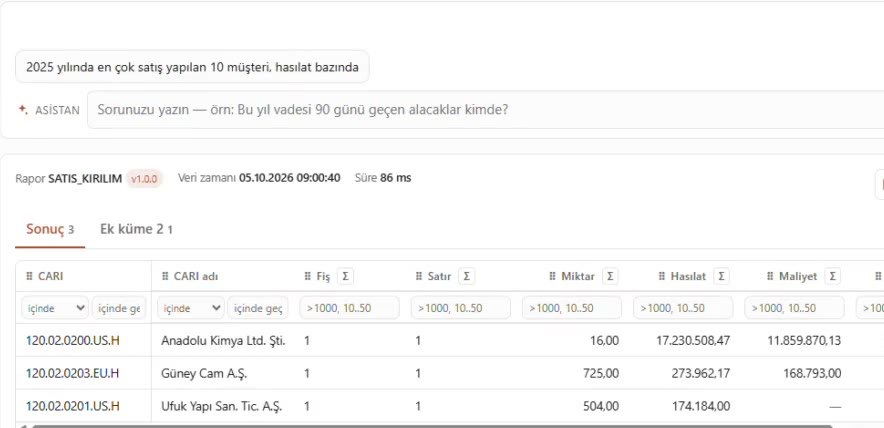
A question asked to the zFlow BI assistant and the result table

zFlow BI

Report on your Logo ERP data in the browser and ask the assistant in Turkish. Ready-made reports, ledger reconciliation checks and one-click Excel. From €47 a month, 30 days free.

zFlow BI page (in Turkish)

On screen: the question "Who were our top 10 customers by sales in 2025?" and its answer, with test data.

Tek Bilgisayar and Edalp Bilişim run their copier fleets, Sesinoks runs its orders and sourcing with this system. Real screens from both are below.

Running a coworking space on OfficeRnD? See zflow for coworking: P&L per location, customer accounts and accountant exports, in English, German and Dutch.

TEK Bilgisayar Bilişim Sistemleri San. ve Tic. A.Ş. and EDALP Bilişim ve Danışmanlık Hizmetleri A.Ş. Built for them. Copier and printer rental, field service. Product: zFlow Servis.

From a photo in the field to a service report and an invoice

Both companies run copier and printer rental fleets. Every month each device is read, technicians go out to faults, parts are replaced and finally invoices are issued.

Before

Things worked, but by hand. Meter, contract and cost data lived in thousands of Excel files; service, technicians and parts were tracked manually every day.

Now

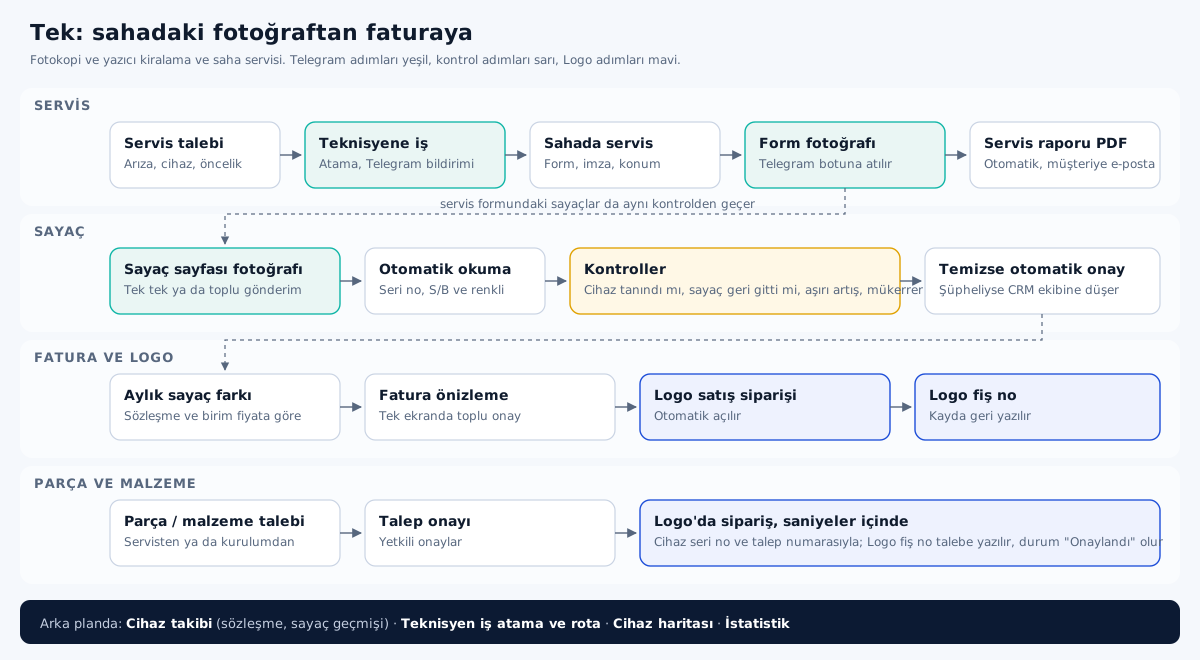
The technician sends a photo from the field. The system reads it, checks it, opens the record, sends the report to the customer and creates the order in Logo ERP.

Flow diagram of the Tek project: service, meter, invoice and parts steps
Meter botbot

Meter reading: send the photo, the system does the rest

The technician sends the meter pages of several devices to the Telegram bot at once. The bot reads each photo and opens a record per device: serial number, old and new counter, black-and-white and colour copy/print breakdown.

Every reading is checked: is the device known, did the counter go backwards, is there an abnormal jump from last month, was the same reading sent before. Clean readings are approved automatically; suspicious ones go to the team.

In the video, one device's counter drops from 3,079 to 3,047. The system catches it and sends it for approval; in a hand-filled Excel sheet this error would have gone onto the invoice unnoticed.
Service botbot

Service form: a photo comes in, a report goes out to the customer

The technician sends a photo of the completed service form to the bot. The system links it to the service request, creates the service report as a PDF and emails it to the customer. The PDF also lands in Telegram.

Counters, parts used and work done are already filled in; the technician does not go back to the office to write it up.

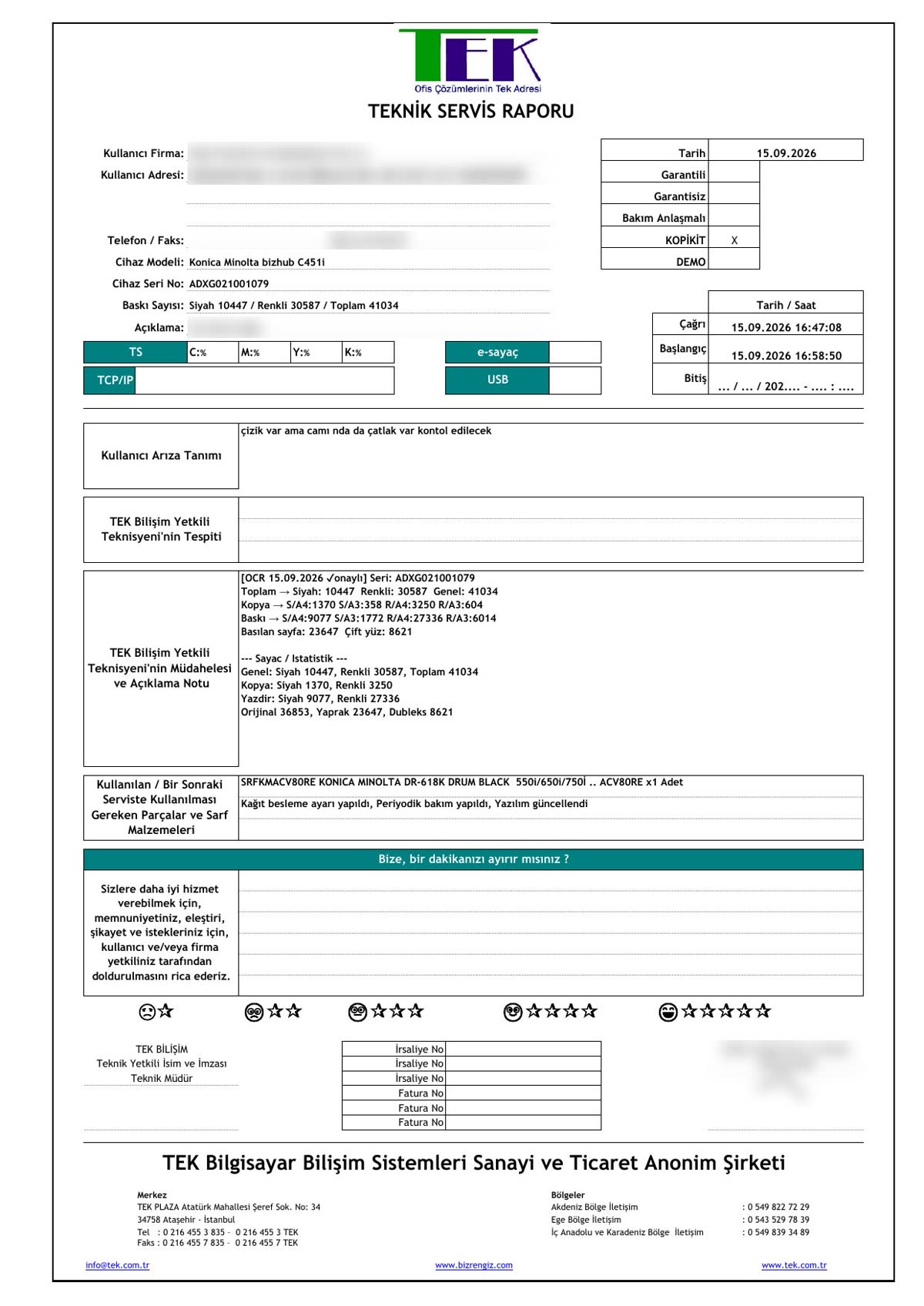
Service report filled in automatically by the system (customer details blurred)
The automatically generated service report. Counters read from the photo are marked "OCR ✓ approved". Customer details are blurred.
The office screen: service requests, fault type, priority and status in one list.

Sesinoks Metal ve Endüstriyel Ürünler San. Tic. A.Ş. Built for them. Stainless tank equipment, heat exchangers, pumps and valves. Product: zFlow Süreç.

From quote to approval, from approval to a Logo ERP document

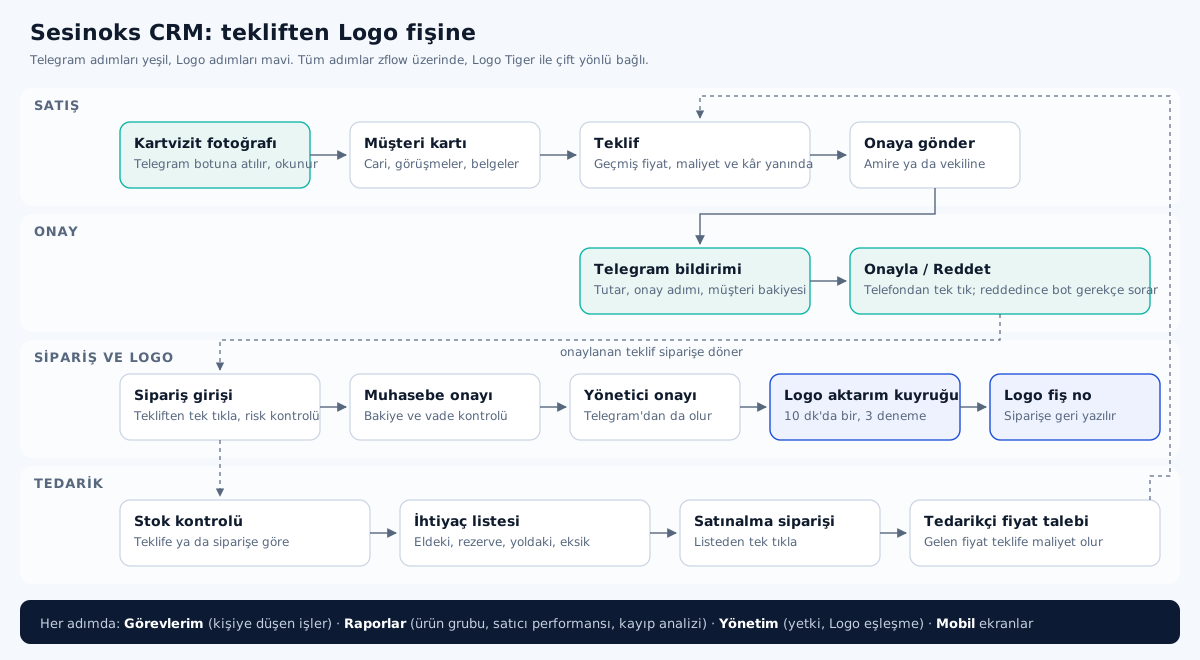
Sesinoks has been selling industrial equipment since 1983. Preparing quotes, getting approvals, entering orders into Logo ERP and sourcing missing materials all happened in different places.

Before

A 20-year-old CRM and manual entry into Logo ERP. Entering one order took 10–15 minutes.

Now

About 62,700 old quotes were migrated to the new system. Approved orders pass the checks and go to Logo ERP automatically; order entry dropped to 1–2 minutes.

Flow diagram of the Sesinoks project: sales, approval, orders and Logo ERP, sourcing
Approval botbot
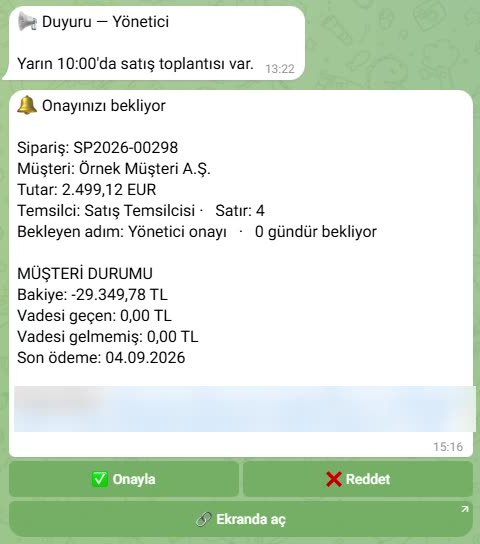
Order approval message in Telegram: amount, approval step, customer balance and last payment, Approve and Reject buttons
Message

Approvals come to the phone

When a salesperson sends a quote or order for approval, the manager gets a Telegram message showing the amount, number of lines, the approval step and the customer's balance, overdue debt and last payment .

The manager taps Approve, or taps Reject and writes a reason. If the manager is on leave, a deputy approves. Business card photos go to the same bot; the details are read and sent for approval as a new customer account.

If someone unknown writes to the bot, they get "You are not authorised"; an admin grants access from the system.

Multi-step approval and transfer to Logo ERP

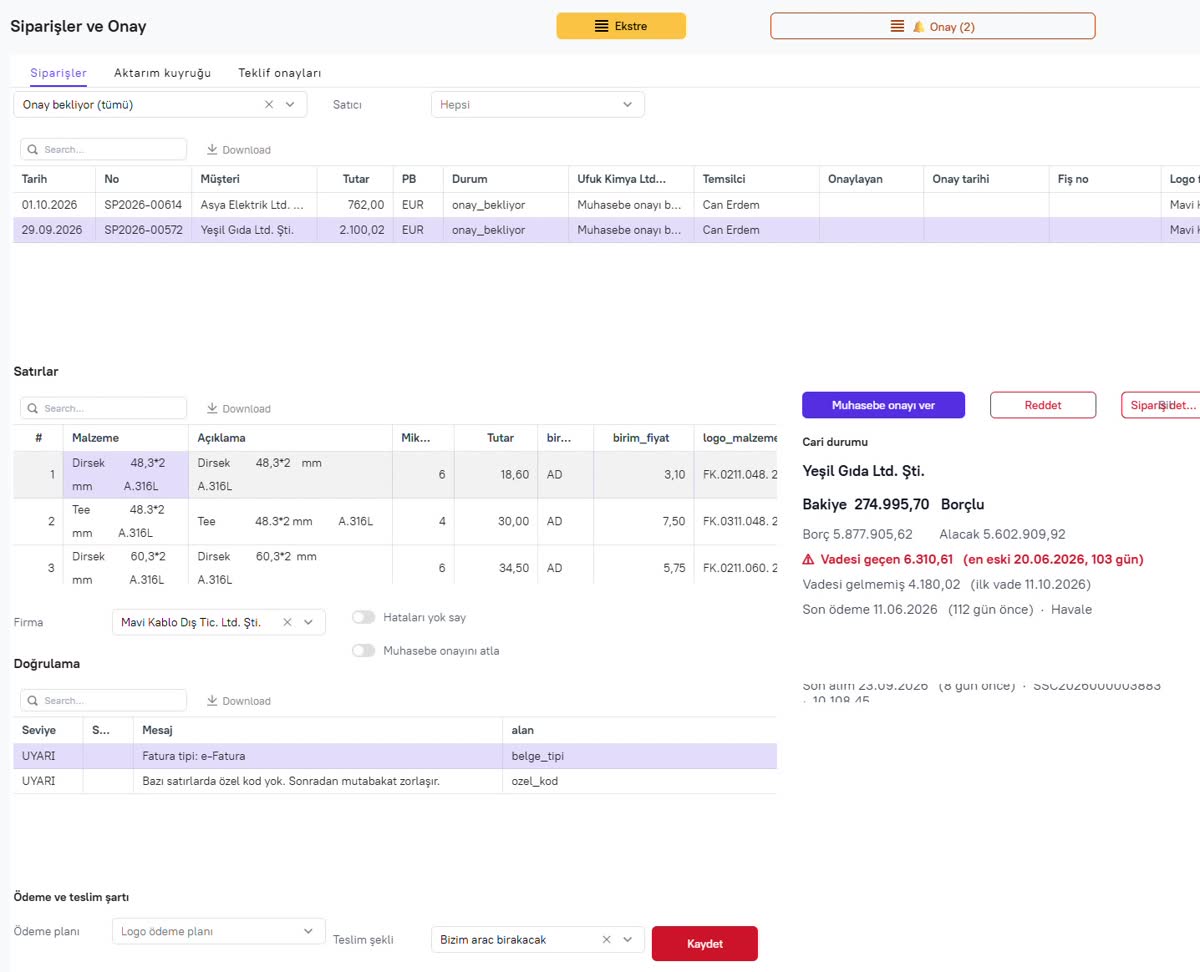
An order goes through accounting first, then management approval. The customer's account status is shown on the approval screen, and the system runs its own checks: "Customer not found in the selected Logo company; the order cannot be transferred" — warnings like this appear before a wrong record reaches Logo ERP.

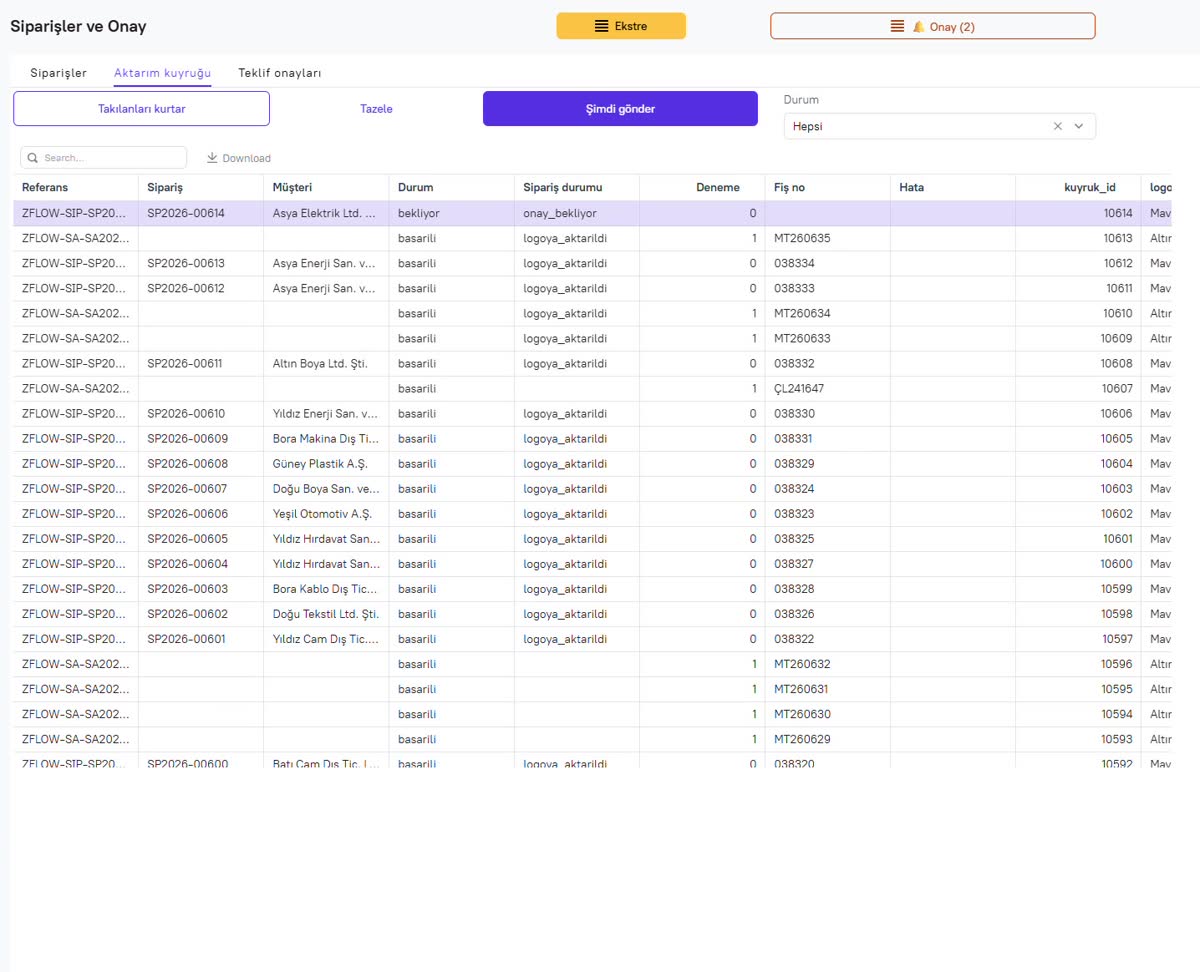
The approved order enters the transfer queue, is sent to Logo ERP, and the Logo document number is written back to the order. Anything stuck is visible in the queue.

Order approval screen and the customer's account status
The approval screen: order lines, validation warnings and the customer's receivables/payables.
Logo transfer queue and document numbers
The Logo transfer queue: status of each order, number of attempts and Logo document number.

Sourcing: what should we buy, and how much?

The sourcing list checks stock against where the demand comes from. By quotes answers "what will we be missing if we win these quotes"; by orders answers "what do we need to buy for confirmed orders".

For each item you see on-hand, reserved, available, requested and in-transit quantities and the net requirement. The list becomes a purchase order in one click; the supplier price is written back to the quote as cost.

How it fits your business

We don't sell a boxed package; we map how your business works today and build the system on the same logic. Where we most often start:

  • Approval and request flows

    Purchasing, expenses, leave, discounts. You can see who it is waiting on; approvals are given from the phone.

    Example: Sesinoks order approval
  • Field service

    Service requests, technician assignment, photos and forms from the field, automatic reports.

    Example: Tek service and meters
  • Quotes, orders and Logo ERP

    Quotes with price history, checked orders, automatic transfer to Logo ERP with the document number.

    Example: Sesinoks
  • Stock and sourcing

    Shortage list by quote or order, supplier price requests, purchase orders.

    Example: Sesinoks sourcing
  • Notifications and reports

    Notifications via Telegram, WhatsApp or email; sales, performance and lost-deal reports.

  • Logo ERP reporting

    A separate product for reporting on your Logo ERP data in the browser by asking questions in Turkish.

    See zFlow BI (in Turkish)

Systems we connect to

zflow runs on its own with its own database, so you can use it without an ERP. If you have accounting or ERP software, it connects to it: there is a ready two-way integration for Logo ERP, and we connect to other software via API, database or file exchange.

  • Logo
  • Turkish e-Invoice / e-Archive
  • Telegram
  • WhatsApp
  • Email
  • Excel
  • Google Sheets
  • SQL databases
  • Other ERP and accounting software
  • REST API

How we work

  1. DiscoveryWe map how the work runs today together and pick the step that wastes the most time.
  2. First versionWe quickly build a first clickable version that works with your real data.
  3. Go-liveWe open it to the team, set up roles and permissions and migrate the old data.
  4. ImprovementWe add what comes up as you use it; as the business changes, so does the system.

The system can run on your own server or in the cloud; your data stays yours.

Who we are

zflow is the process software brand of Öntel Bilişim, an Istanbul company that has provided software, Logo ERP implementation, reporting and support to businesses since 1996.

Öntel Bilgisayar Elektronik San. ve Tic. Ltd. Şti.
İçerenköy Mah. Kolçak Sok. No:3 D:6, Ataşehir / Istanbul, Türkiye

Phone: +90 216 445 50 30
Email: info@zflow.com.tr

About us (Turkish)

Tell us about one task

Describe the one task that wastes the most time. In the first call we will talk about how it could become a system, how long it would take and roughly what it would cost. No commitment.

We only use your details to get back to you.